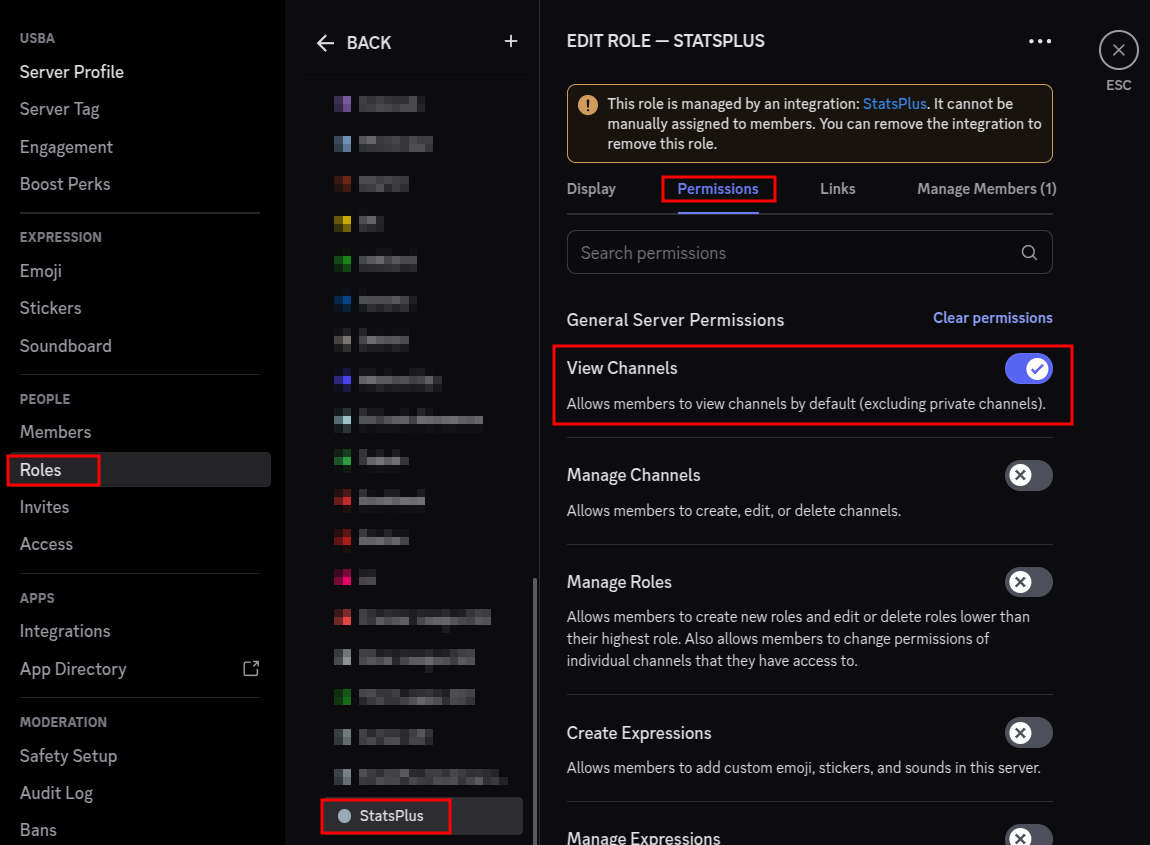
If after connecting your Discord Server to the StatsPlus web tools from the "Discord StatsPlus App Integration" link on the Administrator menu, it's likely the permissions in your Discord server are preventing the bot from getting the member list.
This was the direction from Discord regarding why this happens, and how to resolve:
For the bot to receive the full member list, it needs the following:
- Required Permissions: Ensure your bot has these permissions in the affected server:
- "View Channel" permission for channels where members are present
- The bot must be able to see at least one channel that members can access
- How to check/fix permissions:
- Have a server administrator go to Server Settings → Roles
- Find your bot's role (or check the @everyone role if no specific bot role exists)
- Ensure "View Channel" is enabled for relevant channels
- Alternatively, check individual channel permissions to ensure the bot isn't excluded
- Additional considerations:
- If the server has all members in private channels that the bot cannot view, it won't be able to see those members
- The bot only receives member data for members it shares at least one visible channel with
To quickly test this, you could ask the server administrator to:
- Create a public channel that all members can see
- Ensure your bot has "View Channel" permission for that channel
- Check if the member list populates correctly after this change
Here's a screenshot showing roughly how to get to the bot permission page in a Discord server on the desktop app. If View Channels was not enabled, make sure to "Save Changes" after enabling.