A common issue people have with the StatsPlus app is when it seems to get stuck uploading old CSV files. For example, your league file has progressed to the date July 4, 2025, but when the S+ app uploads CSV, it says it's uploading for the date June 20, 2025.
There are only a couple possible reasons for this:
-
The League Directory setting in the S+ app is not pointing to your latest league folder. This can happen if you had to restore a backup or resolve another issue, and ended up changing the saved_games folder you are using for the latest file. Open the S+ app settings, then check the "League Dir" setting on the Local tab.
-
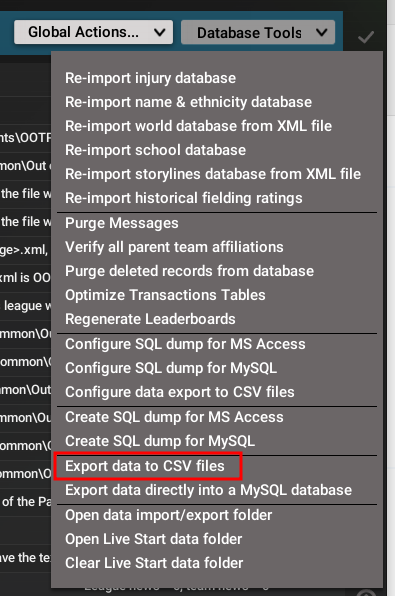
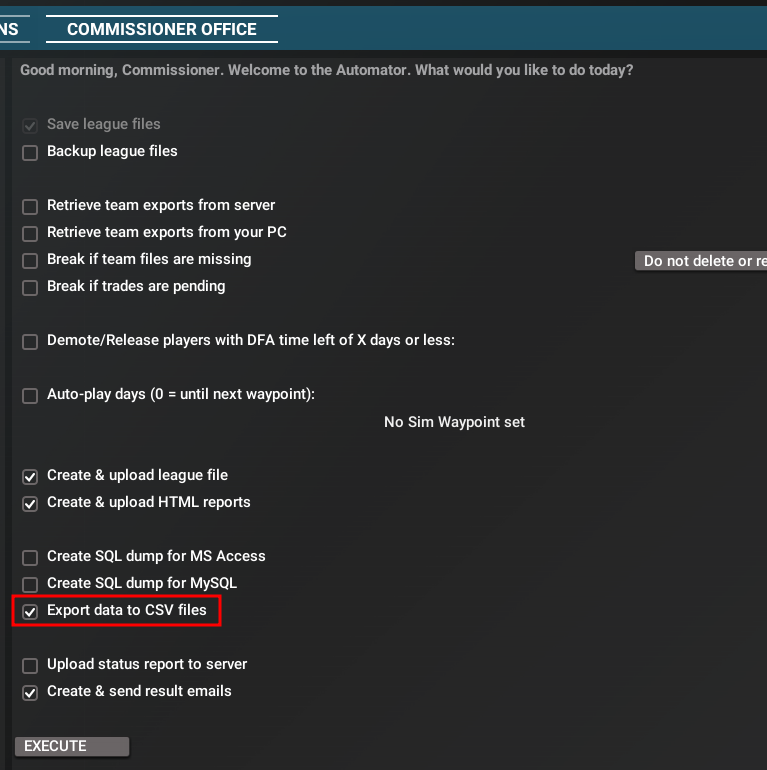
The latest CSV is not being dumped from OOTP at the end of a sim. You can dump the CSV a few different ways, most do it by making sure the "Export data to CSV files" box is checked on the Automator dialog, as shown below. The other way is to manually export the CSV via Game Settings->Database tab->Database Tools drop-down, also shown below.
Alternate method to manually export CSV: